


How to Build a Production-Scale Platform with Full Stack + AI & IoT?
Discover how we built a production-scale Full Stack AI & IoT platform that grew from 20 to 400+ locations using cloud architecture, RabbitMQ, edge computing, AI automation, and scalable backend engineering to deliver reliable, high-performance enterprise applications.
Published: July 31, 2026
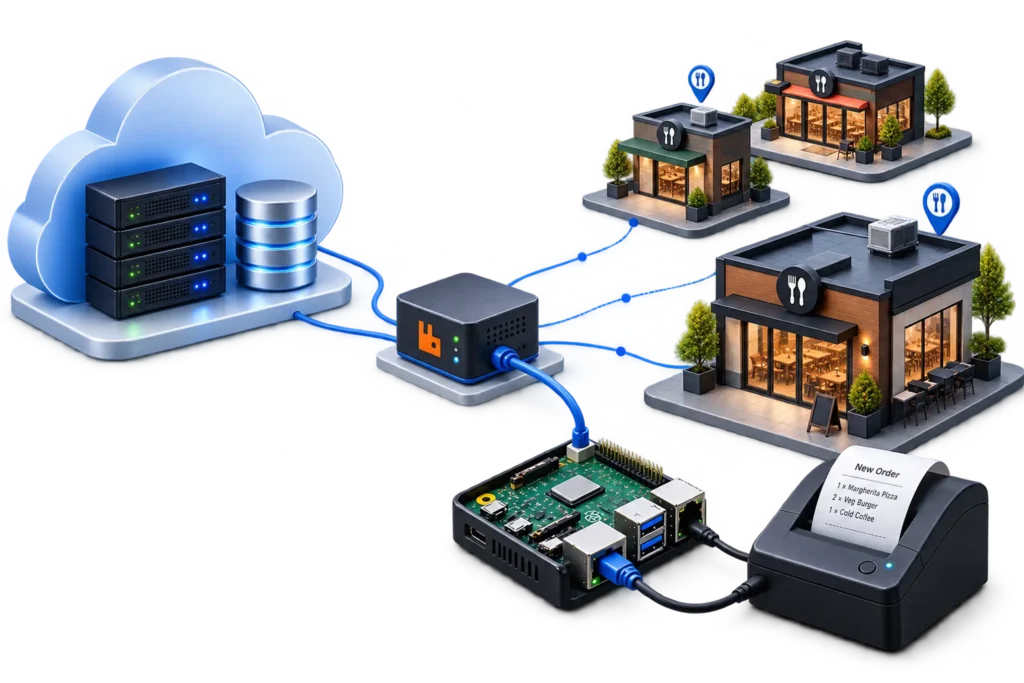
Production-Scale AI & IoT at a Glance
- The problem
Great ideas often get stuck between PoC success and large-scale deployment.
- The solution
Combine AI, IoT, cloud infrastructure, and full-stack software into a single production-ready platform.
- The result
Faster deployment, lower integration risk, and a scalable foundation for growth.
- The key
Device → Edge → Cloud → AI → Dashboard → Mobile App — engineered as one ecosystem.
TABLE OF CONTENTS
WRITTEN BY

Introduction
Most conversations about restaurant technology stop at the mobile app. Someone opens a menu, taps a few items, pays, and the order “just happens.” What’s rarely discussed is what happens in the seconds after that tap — the part of the system that never shows up on a screen but decides whether the kitchen gets the right ticket, on the right printer, at the right table, every single time, across hundreds of locations at once.
That’s the engineering problem this article is about.
Over the past few years, our team at Krishworks Technology Innovations has been building and operating the backend, cloud infrastructure, and IoT layer for a restaurant ordering and management platform. What started as a system supporting around 20 restaurant locations has grown into a platform now running in 400+ restaurants, processing a continuous stream of orders, printer jobs, menu updates, and analytics events every hour of every day.
This isn’t a marketing story about “digital transformation.” It’s a technical account of the architectural decisions — some of them made under production pressure — that let the system keep working as the number of restaurants, devices, and daily orders grew by more than an order of magnitude.
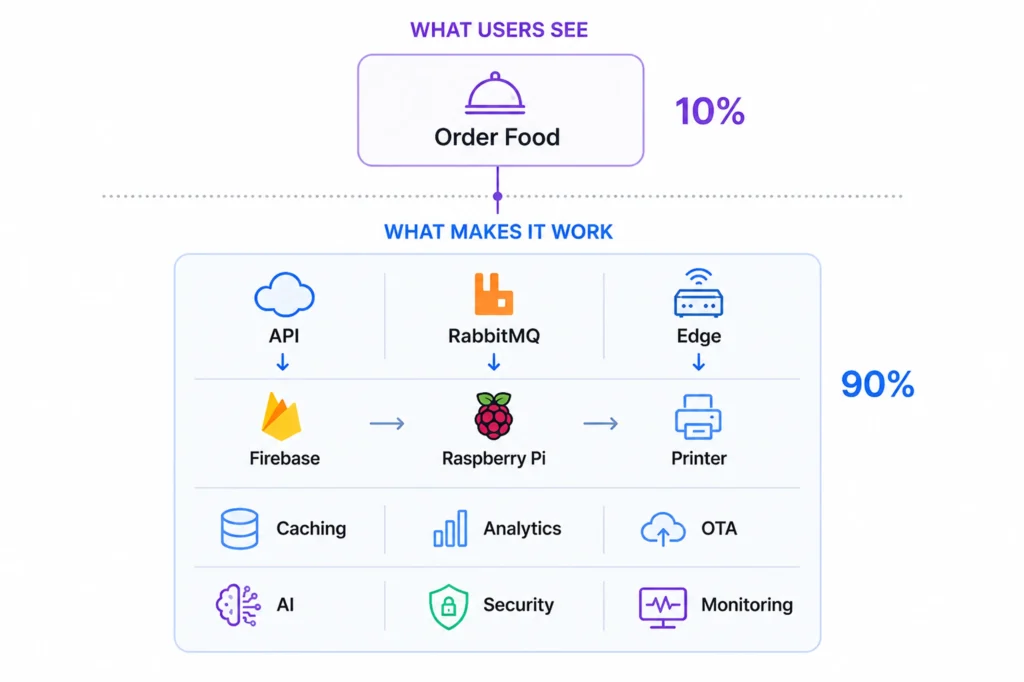
The Challenge
Why Traditional Restaurant Software Doesn't Scale
A single-restaurant ordering system is a comparatively simple engineering problem: one location, one printer, one menu, predictable traffic. Most restaurant software starts life this way, and most of it breaks the same way when a business tries to grow past a handful of locations.
The failure pattern is consistent. The system was built assuming a direct connection between the backend and a single point of sale or printer. Menu management assumed one person updating one menu. Authentication assumed a flat list of users rather than a hierarchy of restaurant admins and a platform-level super admin. None of this is a coding mistake — it’s an architecture that matched the original scope and stopped matching the business the moment the business grew.
Operational Challenges

Multi-Location Management.
Once a restaurant group operates more than a few locations, someone needs a single place to onboard a new restaurant, configure its menu and printers, and monitor whether its hardware is online — without touching code or infrastructure per location.

Hardware Integration.
Every restaurant has its own printers, its own local network, and its own physical layout of kitchen stations. Software that assumes uniform hardware across locations runs into trouble the first time it meets a restaurant with a nonstandard printer model or an unreliable Wi-Fi router.

Cloud Challenges.
As order volume grows, a backend built around synchronous request-response calls to every downstream system (including hardware) becomes a bottleneck and a single point of failure. A slow printer, a flaky local network, or a temporary outage at one restaurant should never be able to slow down or crash the ordering experience for every other restaurant on the platform.

Device Management.
With a handful of devices, you can SSH into each one manually to apply an update. With hundreds of devices spread across independent physical locations — many behind consumer-grade routers, with no static IP and no on-site technician — manual device management stops being possible. You need remote visibility into device health and a deployment mechanism that doesn’t require anyone to be physically present.

Key Takeaway
The problems that show up at 400 restaurants aren’t more of the same problems you had at 20 restaurants — they’re different problems entirely. Synchronous designs, direct hardware connections, and manual device operations all work fine at small scale and become the primary source of outages at production scale.
Building an AI-powered IoT product?
We help turn ideas into scalable AI & IoT platforms.
From 20 Restaurants to 400+ Locations
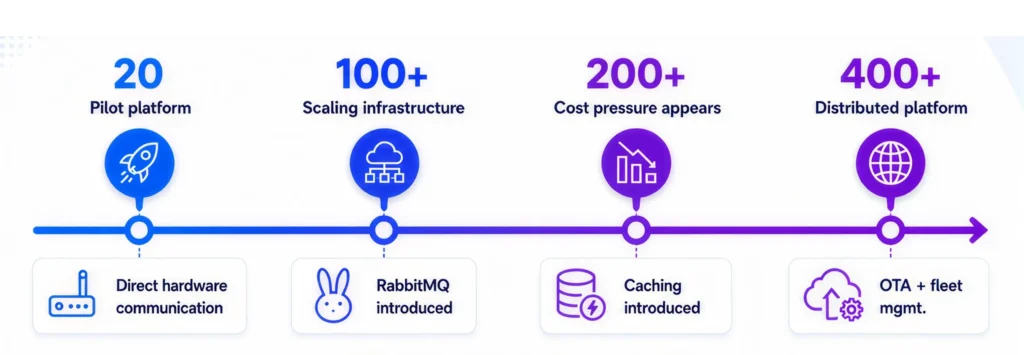
What broke as we scaled?
Database cost
12M reads/day
Caching
Hardware reliability
Direct Connections
RabbitMQ
Operations
Manual Setup
AI + OTA
Understanding the Complete Restaurant Ecosystem
Before going deeper into any single component, it helps to see the platform as three cooperating user roles sitting on top of one shared cloud infrastructure.
Customer Journey
A customer opens the ordering interface — built with Next.js, TypeScript, Redux Toolkit, and TanStack Query — browses the menu, adds items, and places an order. From their perspective, the interaction ends the moment the confirmation screen appears. Everything described in the rest of this article happens in the seconds after that screen loads.
Restaurant Admin
Each restaurant has an operator-facing dashboard for managing menus, viewing incoming orders, configuring kitchen printers, and pulling reports. This is where day-to-day restaurant operations happen: adding a seasonal item, marking a dish unavailable, or checking which printer handled a disputed order.
Super Admin
A platform-level administrator role oversees the entire ecosystem: onboarding new restaurants, monitoring the health of every Raspberry Pi edge device across every location, approving and deploying OTA software updates, and watching platform-wide analytics. This role is what makes centralized management of 400+ independently operating restaurants possible without a proportionally sized operations team.
Backend Services
A Node.js backend sits behind a load balancer, exposing REST APIs consumed by all three roles. It validates requests, manages authentication, reads and writes to the database, and — critically — publishes events to RabbitMQ rather than talking to restaurant hardware directly.
Cloud Infrastructure
Load-balanced virtual machines run the backend over HTTPS. Firebase provides authentication and the primary datastore (Firestore), with Google BigQuery receiving streamed analytics events for behavioral analysis.

IoT Devices
Every restaurant location has a dedicated Raspberry Pi 5 acting as an edge gateway. It subscribes to the RabbitMQ queue assigned to its restaurant, processes incoming order and update messages locally with Python, and communicates with thermal printers over the restaurant’s local network.

Key Takeaway
Three user roles, one shared cloud backbone, and a clean separation between cloud logic and edge hardware — this is the structural pattern that repeats through every layer of the platform described below.
Overall System Architecture
At a high level, the platform is organized into four layers, and the discipline of keeping them cleanly separated is what makes the system maintainable at 400+ locations.
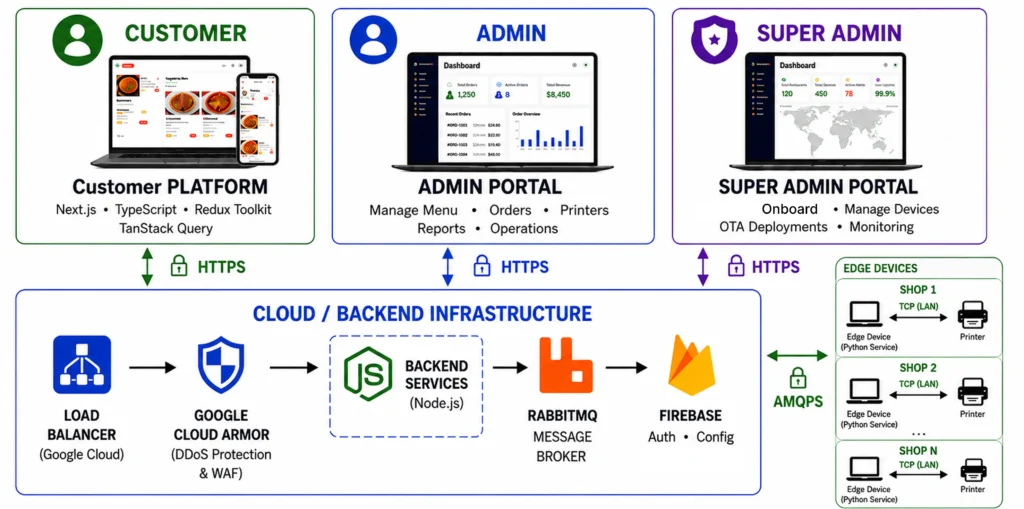
┌────────────────────────────────────────────────────────────────────────────┐
│ FRONTEND LAYER                                                             │
│ Customer Ordering App │ Restaurant Admin Portal │ Super Admin              │
│ (Next.js + TypeScript + Redux Toolkit + TanStack Query)                    │
└───────────────────────────────────┬────────────────────────────────────────┘
                                    │ HTTPS
                                    ▼
┌────────────────────────────────────────────────────────────────────────────┐
│ CLOUD / BACKEND LAYER                                                      │
│ Load Balancer → Node.js REST API → Firebase Auth → Firestore               │
│ Caching Aggregation Layer │ BigQuery Analytics │ AI Pipeline               │
└───────────────────────────────────┬────────────────────────────────────────┘
                                    │ Publish (AMQPS)
                                    ▼
┌────────────────────────────────────────────────────────────────────────────┐
│ COMMUNICATION LAYER                                                        │
│ RabbitMQ — per-restaurant queues, event-driven, durable messages           │
└───────────────────────────────────┬────────────────────────────────────────┘
                                    │ Subscribe (AMQPS)
                                    ▼
┌────────────────────────────────────────────────────────────────────────────┐
│️ EDGE LAYER (Per Restaurant)                                                │
│ Raspberry Pi 5 (Python) → Printer Mapping → TCP → Kitchen Printer          │
└────────────────────────────────────────────────────────────────────────────┘
Frontend Architecture
The customer-facing app, the restaurant admin dashboard, and elements of the super admin console are all built on Next.js with TypeScript. Redux Toolkit manages global application state (cart contents, session data, restaurant configuration), while TanStack Query handles server state — API data fetching, caching, and background refetching — which keeps the two concerns (client state vs. server state) from tangling into the kind of ad hoc state management that becomes unmaintainable as a dashboard grows.
Backend Architecture
The backend is a Node.js service exposing REST APIs. It performs request validation, authentication checks, business logic (menu rules, pricing, order state transitions), and persistence to Firestore. It is intentionally kept unaware of printer hardware, network topology at each restaurant, or device-specific quirks — all of that is pushed to the edge layer.
Communication Layer
RabbitMQ is the architectural hinge of the entire platform. Instead of the backend calling out to restaurant hardware synchronously, it publishes a message and moves on. Every restaurant has its own dedicated queue (or set of queues), and its Raspberry Pi subscribes only to the messages meant for it. This is what allows the cloud and the edge to fail independently — a printer jam at one restaurant, or a temporary internet outage at another, never propagates back into the backend or affects any other location.
Security
Communication between the backend and RabbitMQ, and between RabbitMQ and each Raspberry Pi, happens over AMQPS (AMQP over TLS), not plaintext AMQP. Customer-facing traffic runs over HTTPS. Printers are never exposed to the public internet — they’re only reachable from their local Raspberry Pi over the restaurant’s own local network, which removes an entire class of attack surface that a cloud-to-printer-direct architecture would otherwise expose.
Scalability Design
Because the backend never talks to hardware directly, it can be scaled horizontally behind the load balancer without any coordination with the edge layer. Because each restaurant’s Raspberry Pi only sees its own queue, adding restaurant number 401 doesn’t add load to restaurant number 1’s edge device or change its message volume. Both layers scale independently, which is the core property that let this platform grow 20x in location count without a 20x rewrite.
Best Practice: Design the boundary between your cloud backend and any physical hardware layer as an asynchronous message boundary, not a direct API call. It costs a small amount of additional complexity up front (you need a broker, and you need to think about message durability and acknowledgment) and it buys you independent scaling and independent failure domains—which is usually the difference between a system that degrades gracefully and one that cascades.
Full Stack Development Architecture
FRONTEND
- Next.js
- TypeScript
- Fast customer and admin interfaces
STATE
- Redux Toolkit
- TanStack Query
- Client state + server state
BACKEND
- Node.js
- REST APIs
- Business logic + event processing
DATA
- Firebase
- Firestore
- Authentication + transactional data
Why Next.js?
Server-side rendering, routing, and scalable UIdelivery.
Why Redux + TanStack Query?
Clear separation of client state and server data.
Backend design
Stateless APIs, validation, and event event-driven workflows
Authentication and security
Identify, access control, and protected transactions.
Distributed Systems Using RabbitMQ
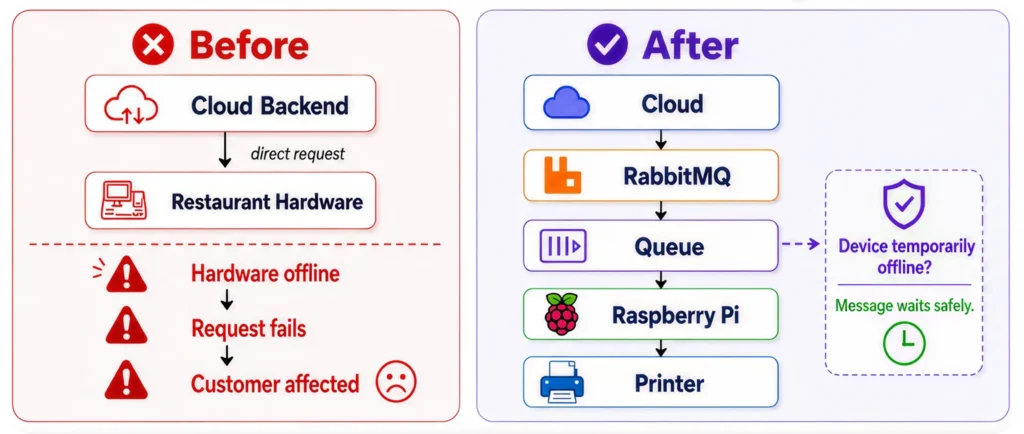
Common Mistake : Treating a message queue as “just a slower API call.” A queue is not a replacement for a request/response API — it’s a deliberate design choice to decouple two systems that shouldn’t be forced to be available and fast at the same time. Teams that bolt a queue onto a system without changing their mental model (e.g., blocking and waiting for the eventual response) usually don’t get the reliability benefits they were hoping for.
IoT Edge Computing with Raspberry Pi
Edge Computing
Edge computing, in this platform, means one specific thing: hardware-facing logic runs on a device physically located at the restaurant, not in the cloud. This isn’t a trend-following choice — it’s a direct response to the fact that kitchen printers are local, latency-sensitive, and shouldn’t be reachable from the public internet.
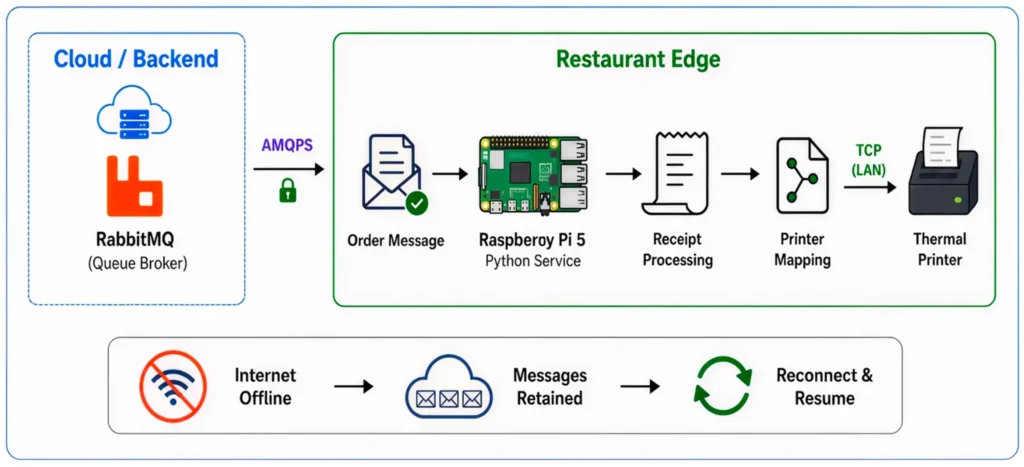
Raspberry Pi Architecture
Every restaurant runs a dedicated Raspberry Pi 5 as its edge gateway. In the related Hopa-Print system, the device stack is intentionally lightweight: a Bash layer for installation, service management, and system operations (install.sh, uninstall.sh, printer_runner.sh, health.sh), a Python service that owns the RabbitMQ connection and business logic, and a Node.js service — using headless Chrome — dedicated purely to rendering receipt HTML into a printable image. Two cron jobs run continuously on the device: a health check every two minutes and an update check every minute, giving the platform team near-real-time visibility into every device’s status without polling from the cloud side.
Offline Processing
If internet connectivity drops, the Raspberry Pi doesn’t stop working — it queues incoming orders locally (backed by RabbitMQ’s own durability once connectivity resumes) and continues serving the restaurant’s local printing needs where possible, rather than taking the kitchen offline because of a cloud dependency.
Printer Communication
Printer identity and mapping is handled at the edge. The device determines which physical printer — by MAC address or IP — should receive a given order, based on configuration synced to the device, rather than the cloud needing to know the physical network layout of every restaurant kitchen.
TCP Communication
Once the correct printer and receipt image are determined, the final delivery step is a TCP connection from the Raspberry Pi to the printer over the restaurant’s local network — a short, local, low-latency hop that never touches the public internet.
Local Processing
The full local pipeline — as documented in the Hopa-Print architecture — looks like this: the Python service receives a print job from RabbitMQ, hands the order’s HTML content and a temp file path to the Node.js service, which launches headless Chrome (via Puppeteer) to render the receipt into an image and save it to the file system. The Python service then reads that image back, sends it to the mapped printer over TCP, and — only after receiving print confirmation — acknowledges the original message back to RabbitMQ, removing it from the queue.
RabbitMQ Queue → Python Service → Node.js Service → Headless Chrome
       │                                                  │
       │                                                  │
       │                             Generate & save receipt image
       │                                                  │
       │                                                  │
       └────────────── Python reads image ◄───────────────┘
                              │
                              │
                    Send image to Printer (TCP)
                              │
                              │
                     Printer confirms print
                              │
                              │
       Python acknowledges message → RabbitMQ (message removed)
Key Takeaway : The acknowledgment only fires after the printer confirms the job — not after the message is received. That single design detail is what prevents “lost tickets”: if the device crashes between receiving the message and confirming the print, RabbitMQ redelivers it instead of assuming success.
Order Processing Flow
It’s worth walking through the complete path of a single order end to end, because every architectural decision described above exists to serve this exact flow reliably, thousands of times a day, across 400+ independent locations.
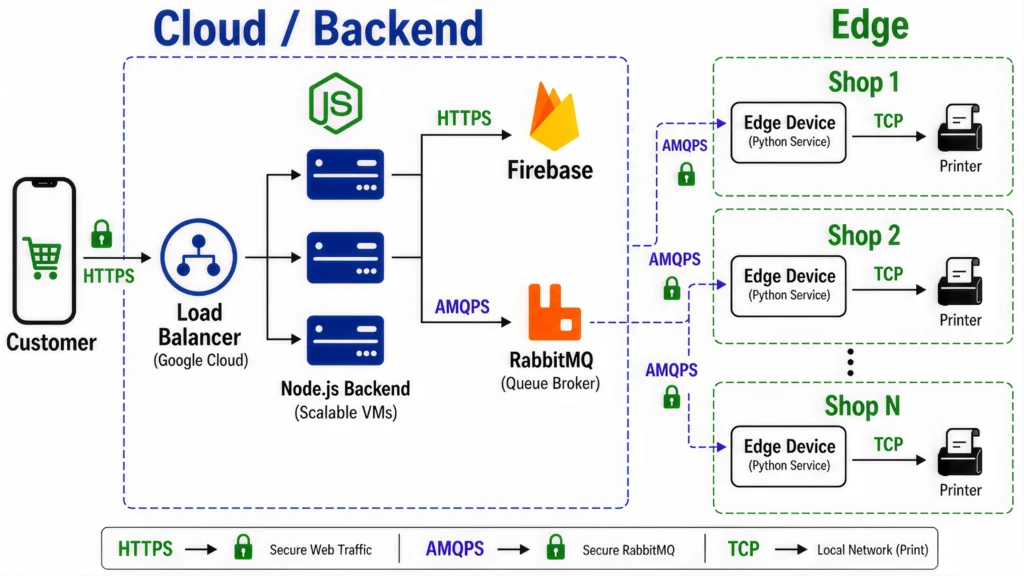
- Validate order
- Fetch restaurant configuration (Firebase / Cache)
- Store order (Firestore)
- Publish event (AMQPS)
- Receive message (AMQPS)
- Resolve printer mapping
- Request receipt image (Node.js + Headless Chrome)
- Printer confirms print
- Pi acknowledges the message
- RabbitMQ removes the message from the queue
Step by step:

Customer places an order through the Next.js frontend. The request is sent over HTTPS.

Load Balancer receives the request first and distributes it across multiple backend virtual machine instances, so no single server becomes a bottleneck.

Backend (Node.js) validates the order, retrieves the restaurant’s configuration (menu, printer mapping, pricing rules — served from cache where possible), and writes the order to the database.

Instead of contacting restaurant hardware directly, the backend publishes an event to RabbitMQ over AMQPS, structured as an order message tagged with the order ID.

RabbitMQ routes the message to the queue dedicated to that specific restaurant.

The restaurant’s Raspberry Pi, subscribed only to its own queue, receives the message and processes it locally with Python.

The Pi resolves which kitchen printer should receive the order based on its local printer mapping, requests a rendered receipt image from its local Node.js/headless Chrome service, and sends the finished image to the printer over TCP on the local network.

Once the printer confirms the job, the Pi acknowledges the message back to RabbitMQ, and the order is marked complete — removed from the queue and reflected back in the restaurant admin dashboard.
Cloud Infastructure
Virtual Machines
The backend runs on load-balanced virtual machines rather than a single server instance. This allows horizontal scaling-adding more instances as order volume grows-instead of vertical scaling, which has a hard ceiling and a much higher blast radius when something goes wrong.
Load Balancer
Every request hits the load balancer before it reaches a backend instance. Beyond simple traffic distribution, this gives the platform the ability to take individual instances out of rotation for maintenance or after a failed health check, without any customer-visible downtime.
HTTPS
All customer, restaurant admin, and super admin traffic is encrypted end to end over HTTPS. This isn’t just a compliance checkbox — with payment-adjacent order data flowing through the system, encryption in transit is a baseline requirement.
High Availability
High availability here comes from the combination of multiple backend instances behind a load balancer, RabbitMQ’s durable, acknowledgment-based message delivery, and the edge layer’s ability to keep functioning locally during brief connectivity interruptions. No single component failure – a backend instance, a restaurant’s internet connection, or an individual printer – is capable of taking down the platform.
Scalability
Scalability is designed in at every layer independently: the backend scales by adding VM instances behind the load balancer; RabbitMQ scales by adding restaurant-specific queues, which is inherently linear and additive; and the edge layer scales simply by shipping another Raspberry Pi to the next restaurant being onboarded – none of these require touching the other layers.
AI Development in Restaurant Automation
AI OCR
Restaurant onboarding used to be one of the slowest parts of adding a new location: someone had to manually type in every menu item, category, price, and description — often from a PDF, a photograph of a printed menu, or a spreadsheet in a regional language. We built an AI-powered menu processing pipeline that takes an uploaded menu document and extracts structured data — categories, item names, prices, and descriptions — using OCR combined with a language model to interpret and structure the extracted text.
Menu Processing
Once extracted, the AI system organizes items into the platform’s menu hierarchy and imports them directly into the restaurant management system, ready for a restaurant admin to review rather than build from scratch.
Smart Categorization
Items are automatically grouped into sensible categories (starters, mains, beverages, desserts) based on the extracted content, rather than requiring a restaurant admin to manually classify every item — a task that scales poorly across menus with hundreds of items.
Automation
The combined effect is that onboarding a new restaurant’s menu goes from a multi-day manual data-entry task to a review-and-approve workflow, which matters directly when the business objective is adding new locations quickly.
Business Benefits
Fewer manual entry errors, faster time-to-launch for new restaurant locations, and less dependency on a data-entry team that would otherwise need to scale linearly with the number of new restaurants being onboarded each month.
Best Practice: Apply AI where it removes genuinely repetitive human work with a clear, checkable output (structured menu data that a human reviews before publishing) rather than where it makes an unsupervised decision that directly reaches the customer. Menu digitization is a strong fit for this pattern; fully autonomous pricing or menu changes would not be.
Multi Language Platform
Localization
Restaurants on the platform operate across different regions and languages, and both customers and restaurant staff need to interact with the system in their own language — not just a translated UI shell, but menus, item descriptions, and notifications that read naturally.
Internationalization
On the frontend, rather than calling a translation API on every page load for every customer, the platform uses localized language files bundled with the application. This trades a small amount of translation flexibility for a large gain in page load performance and a large reduction in ongoing API costs — a reasonable trade for content (UI strings) that doesn’t change often.
Google Translate API
For dynamic, frequently changing content — restaurant menus, in particular — the backend integrates the Google Translate API, giving restaurant admins a fast way to translate a menu into additional languages with minimal manual effort, which is then reviewed and published rather than served untranslated in real time to every customer request.
Big Data & Analytics
Google BigQuery
Beyond order processing, the platform streams behavioral events into Google BigQuery, kept deliberately separate from the transactional Firestore workload so that analytical queries — which tend to scan large amounts of historical data — never compete with or slow down live order processing.
User Behaviour
Event streams capture how customers actually move through the ordering experience: which menu categories get opened, which items get added to a cart and then removed, and where in the flow customers abandon an order — all of which is difficult to infer from order data alone, since order data only reflects completed transactions.
Heatmaps
Aggregated interaction data can be visualized as heatmaps across menu categories and items, giving restaurant admins a direct view of which parts of their menu customers actually engage with, as distinct from which parts they merely purchase.
Analytics
Analytics extends to anomaly detection — flagging unusual patterns, such as a location experiencing an unexpected drop in orders (which may indicate a technical problem, such as a printer or connectivity issue, well before a customer complaint or a support ticket surfaces it).
Customer Journey
Stitching together events from first menu view through to order completion gives a full picture of the customer journey, which is the raw material for product decisions — where to simplify a flow, where checkout friction is costing conversions, and which features restaurant admins actually use.
Business Intelligence
The combination of BigQuery analytics and Firestore transactional data gives both the platform team and individual restaurant operators data-backed answers to operational questions, replacing intuition with evidence — which items to promote, which locations need operational attention, and where the ordering experience itself needs improvement.
Intelligent Caching Strategy
This section covers one of the more consequential production lessons from the entire project.
As the platform grew past a few hundred locations, the backend was performing nearly 12 million Firestore read operations every single day — restaurant configuration, menu data, printer mappings, and visitor session data, fetched fresh on nearly every request. Firebase costs scaled directly with location count and traffic, to the point where infrastructure cost was becoming a real business concern rather than a rounding error.
The instinct in this situation is often to start optimizing individual queries — smaller documents, more selective fields, better indexes. We took a different approach: we introduced a Caching Aggregation Layer in front of Firestore for frequently accessed, infrequently changing data — restaurant configuration, menus, and printer mappings chief among them.
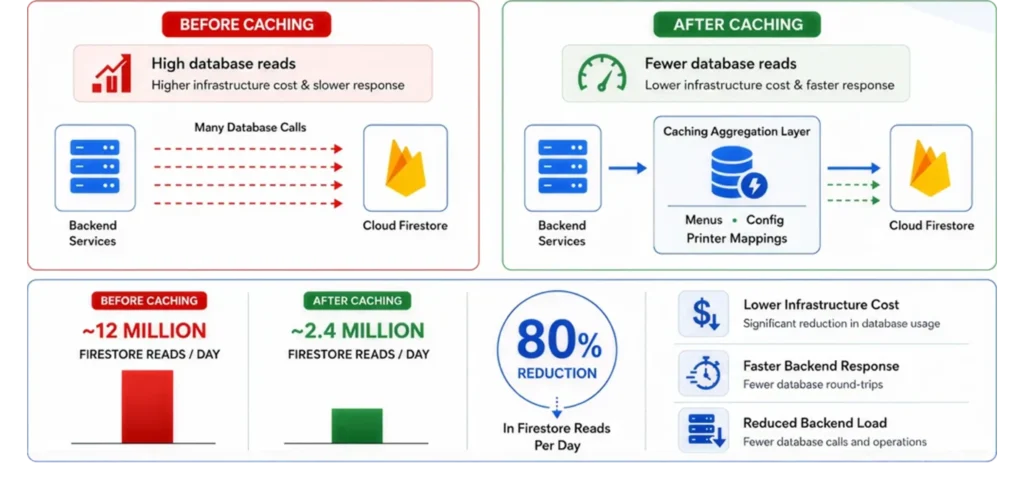
The results:
| Metric | Before Caching | After Caching | Improvement |
|---|---|---|---|
| Firestore reads/day | ~12 million | ~2.4 million | ~80% reduction |
| Firebase infrastructure cost | Baseline | ~20% of baseline | ~80% reduction |
| Backend response time | Baseline | Faster | Reduced database round-trips |
| Backend load | Baseline | Lower | Fewer downstream calls per request |
The insight here generalizes well beyond this specific platform: sometimes the highest-leverage optimization isn’t writing faster code — it’s not making the database call in the first place. Restaurant configuration doesn’t change every second; there’s no reason to fetch it from a live database on every single order.
Key Takeaway : Apply AI where it removes genuinely repetitive human work with a clear, checkable output (structured menu data that a human reviews before publishing) rather than where it makes an unsupervised decision that directly reaches the customer. Menu digitization is a strong fit for this pattern; fully autonomous pricing or menu changes would not be.
Common Mistake : Caching everything indiscriminately, including data that changes frequently (like live order status), which introduces stale-data bugs that are far more expensive to debug than the database cost the cache was meant to save. Cache what changes rarely; leave what changes often uncached, or cache it with a short, deliberate TTL.
Taking your IoT product to production?
Full-stack AI & IoT engineering, we build it end-to-end.
Secure OTA Update Pipeline
Remote Updates
With hundreds of Raspberry Pi devices distributed across independently operated restaurant locations — many without on-site technical staff — manual software updates were never a viable long-term operating model. The platform includes a secure Over-The-Air (OTA) update pipeline built specifically for this constraint.
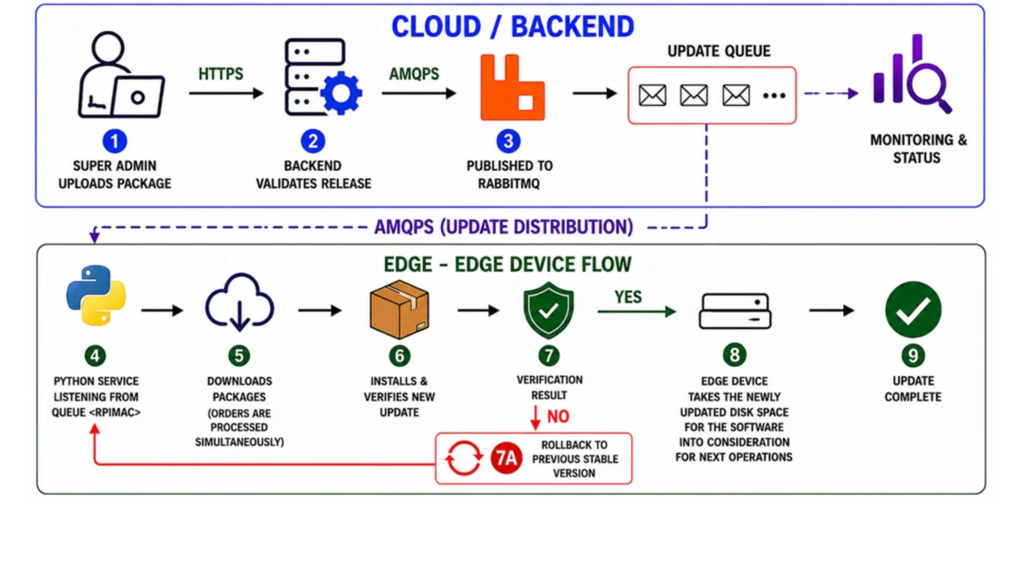
Step-by-step OTA workflow:
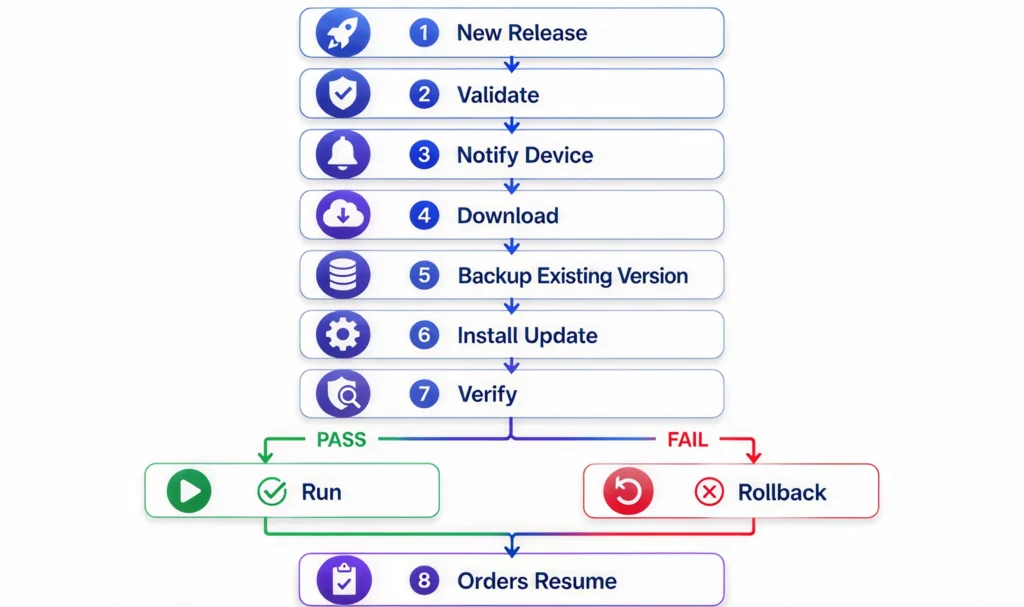
New src → Run installer.sh
Best Practice : Any OTA system for field-deployed hardware should treat “the update failed” as an expected case to design around, not an edge case to handle later. Automatic backup-before-update and automatic rollback-on-failure should be there from the first version of the pipeline, not added after the first device gets bricked in production.
Engineering Lessons Learned
01
DESIGN FOR FAILURE
Failure isn't an exception. It should be part of the architecture.
02
DECOUPLE THE CLOUD FROM HARDWARE
Use asynchronous boundaries between software and physical systems.
03
SCALE EACH LAYER INDEPENDENTLY
Cloud, messaging and edge shouldn't need to scale together.
04
CACHE WHAT CHANGES SLOWLY
Sometimes the best database optimization is avoiding the query.
Business Impact
Technology decisions only matter to the extent they move a real business metric. Here’s what this architecture translated to in practice:
- Growth from ~20 restaurants to 400+ locations on the same core architecture, without a platform rewrite.
- ~80% reduction in Firebase/Firestore infrastructure costs, driven entirely by the caching aggregation layer.
- Faster restaurant onboarding, through AI-assisted menu digitization replacing manual data entry.
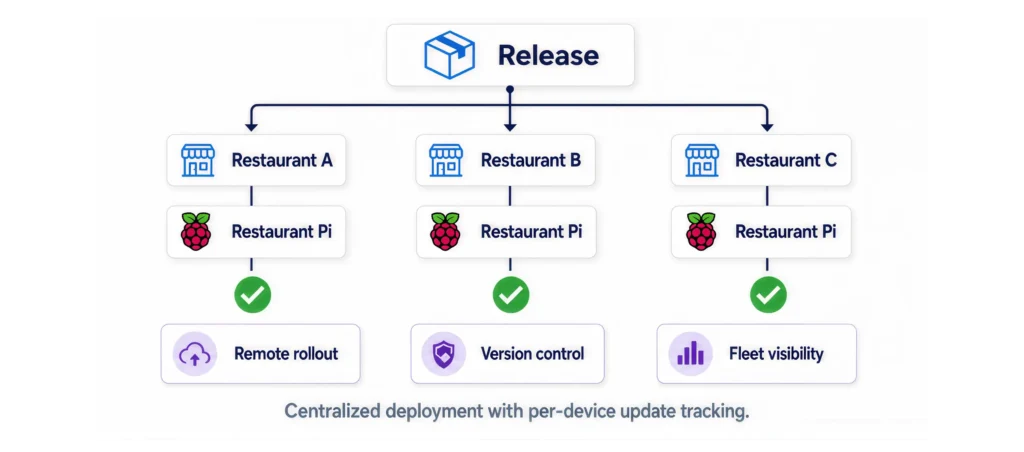
- Remote device management across hundreds of Raspberry Pi edge devices, with no on-site technical visits required for routine operations.
- Automated, zero-downtime software deployment to the entire device fleet through the OTA pipeline.
- Improved operational reliability , with printer and connectivity issues contained to individual restaurants rather than affecting the platform.
- Data-driven product decisions, enabled by BigQuery-based behavioral analytics separate from transactional load.
Technology decisions only matter to the extent they move a real business metric. Here’s what this architecture translated to in practice:
Why Enterprises Choose Krishworks
Enterprises, restaurant chains, manufacturers, and logistics companies come to Krishworks Technology Innovations for the same underlying reason: they have a system that needs to work reliably across physical locations, physical hardware, and real operational pressure — not just in a controlled demo environment.
Enterprise Software.
We design backend systems and dashboards around real multi-tenant, role-based operational needs — not a single-user prototype scaled up after the fact.
IoT
As an IoT development company, we cover the full stack from hardware selection and firmware through edge software and cloud integration, which matters when a project (like a restaurant printer network) genuinely spans a circuit board and a cloud backend in the same sprint.
AI.
We apply AI where it removes real, repetitive manual work with a checkable output — menu digitization, document processing, anomaly detection — rather than treating it as a headline feature disconnected from the operational problem.
Cloud.
Our cloud architecture practice is built around independent scaling and failure isolation between layers, drawing directly from experience running production systems across hundreds of distributed locations.
Full Stack.
One team, one codebase discipline (TypeScript across frontend and backend), covering customer-facing apps, internal dashboards, and the APIs that connect them — which avoids the coordination overhead of stitching together separate frontend and backend vendors.
Industrial Automation.
The same architectural patterns behind restaurant kitchen printing — edge gateways, message queues, OTA device management — apply directly to industrial IoT, asset tracking, and manufacturing telemetry, which is a meaningful share of our client base outside restaurant technology.
Technology Stack
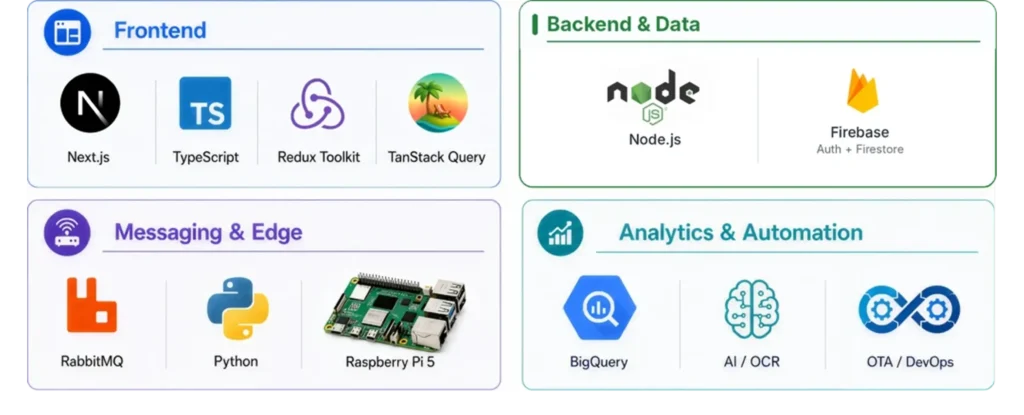
| technology | purpose | benefits | business value |
|---|---|---|---|
| Next.js | Frontend framework for customer app and admin dashboards | Server-side rendering, fast load times, unified React/TypeScript codebase | Better SEO for customer-facing pages, faster feature delivery |
| TypeScript | Static typing across frontend and backend | Catches contract mismatches and bugs before production | Fewer production incidents, easier onboarding for new engineers |
| Redux Toolkit | Client-side application state management | Predictable, structured state logic | Maintainable dashboards as feature count grows |
| TanStack Query | Server state management and caching | Automatic caching, background refetching, cache invalidation | Fewer redundant API calls, more responsive UI |
| Node.js | Backend REST API service | Non-blocking I/O suited to high-concurrency, I/O-heavy workloads | Handles concurrent order volume efficiently |
| RabbitMQ | Message broker between cloud and edge devices | Asynchronous, durable, acknowledgment-based delivery | Independent failure domains; no single restaurant can affect another |
| Firebase (Auth + Firestore) | Authentication and primary transactional database | Managed auth, flexible document model | Faster development, reduced operational overhead |
| Python | Edge device business logic (Raspberry Pi) | Strong hardware/IoT ecosystem, simple to maintain | Reliable local order and printer processing |
| Raspberry Pi 5 | Restaurant edge gateway hardware | Low-cost, low-power, capable of local compute and networking | Cost-effective per-location hardware footprint |
| Google BigQuery | Analytics data warehouse | Handles large-scale analytical queries without affecting transactional load | Data-driven product and operations decisions |
| AI / OCR pipeline | Menu digitization and structuring | Converts unstructured menu documents into structured data | Faster restaurant onboarding, fewer manual entry errors |
| DevOps / OTA Pipeline | Remote device deployment and update management | Automated rollout with backup and rollback | Zero-downtime updates across hundreds of devices |
| Edge Computing | Local processing on restaurant hardware | Low latency, offline resilience, reduced attack surface | Continued operation during connectivity interruptions |
Future of AI + IoT + Full Stack Development
Enterprise Software.
- AI agents
- Predictive analytics
EDGE INTELLIGENCE
- Edge AI
- Autonomous operations
CONNECTED OPERATIONS
- Industrial IoT
- Digital twins
Conclusion
The engineering story behind scaling a restaurant platform from 20 to 400+ locations isn’t really about any single technology. Next.js, Node.js, RabbitMQ, Raspberry Pi, and BigQuery are all reasonable, well-understood tools — the actual engineering work was in the decisions connecting them: publishing events instead of calling hardware directly, caching aggressively where data is stable, designing OTA updates around automatic rollback rather than hoping deployments succeed, and keeping every layer independently scalable and independently failable.
That’s the same set of decisions that shows up whenever a business needs software connected to physical operations at scale — restaurant chains, manufacturers, logistics networks, and industrial operators alike. If your team is running into the same category of problems — hardware that needs to stay reliable across many locations, a cloud bill growing faster than your user base, or a device fleet that’s outgrown manual management — this is exactly the kind of architecture problem we work on.
Krishworks Technology Innovations designs and builds custom software, AI, IoT, cloud, and enterprise application systems for businesses that need their technology to hold up under real production conditions. If you’re evaluating how to architect a platform like this — or scale one you’ve already built — get in touch with our engineering team to talk through your architecture.




- Drafted using AI


 Hardware/PCB design & addon services


