


How We Built IoT Mobile Apps for Smart Vehicle Control
Connected mobility. Real control. Built for what moves the world.
Published: Sept 16, 2026
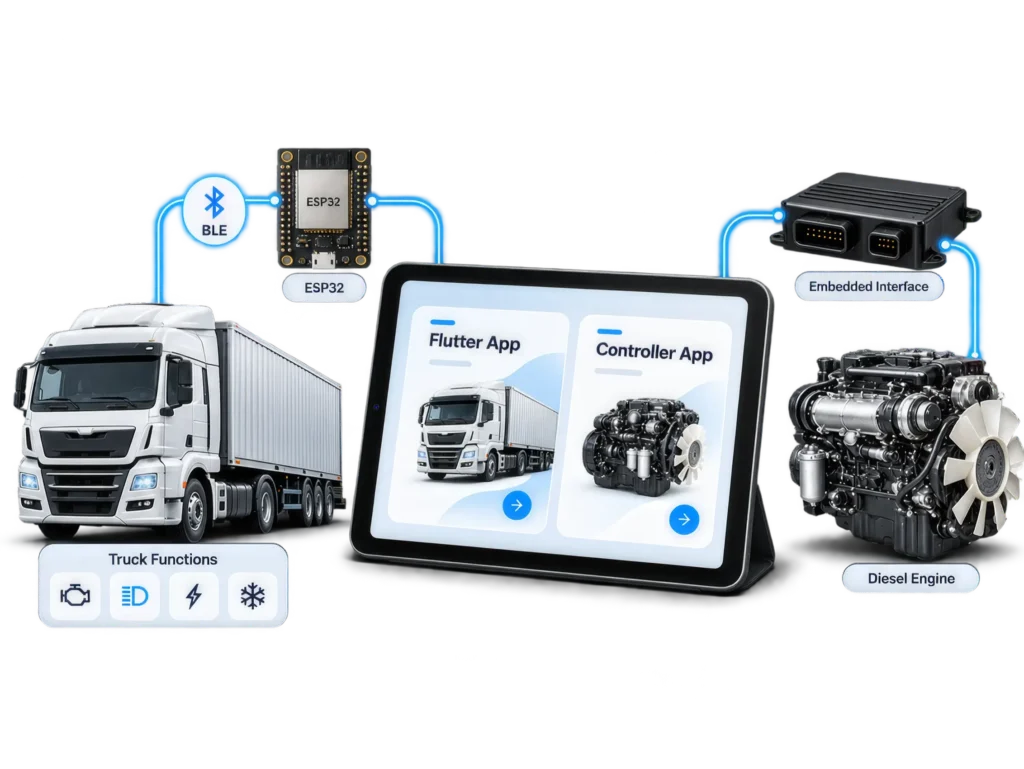
Connected Vehicle App in a Nutshell
- The problem
Vehicle and engine data is difficult to access and manage in real time.
- The solution
Integrate IoT devices with intuitive mobile applications.
- The result
Remote monitoring and control from anywhere.
- The takeaway
TABLE OF CONTENTS
WRITTEN BY

Engineering Mobile Control Interfaces for Connected Vehicle and Diesel Engine Systems
Connected vehicle systems increasingly depend on software not only for monitoring, but also for direct interaction with physical equipment. In this project, we developed two mobile applications for the same client, each addressing a different layer of vehicle control.
The first application provided direct control of vehicle functions such as the engine, lights, inverter and air conditioning through Bluetooth Low Energy (BLE). The second application addressed a more complex problem: reproducing the operational capabilities of a diesel engine controller within a mobile interface.
Both applications were designed for local operation without internet connectivity. The mobile device communicates directly with embedded electronics installed in the vehicle, allowing an authorized operator to control and monitor the system within BLE range.
Although both applications use a similar communication principle, their engineering requirements were significantly different.
| Application 1 | Application 2 | |
|---|---|---|
| Primary purpose | Control vehicle functions | Monitor, configure and control a diesel engine |
| Mobile application | Flutter mobile/tablet application | Mobile engine-control dashboard |
| Communication | BLE | BLE |
| Embedded interface | ESP32 | Engine controller with MCU and BLE interface |
| Internet dependency | None | None |
| Typical operations | Engine, lights, inverter, A/C | Start, stop, reset, operating modes, engine configuration, status and alarms |
The case-study in 30 Seconds

The problem
Operators needed a simpler software interface for interacting with functions that traditionally depended on physical vehicle controls and dedicated engine-controller interfaces.

The hardware
ESP32-based electronics were integrated into the truck, providing Bluetooth Low Energy connectivity between the physical vehicle systems and the application.

The application
A cross-platform application was developed using Flutter for mobile phones and tablets.

The connectivity
The application communicates locally over BLE, allowing vehicle functions to be controlled without depending on internet connectivity.

The security
Passkey-based Bluetooth pairing restricts communication to authorized devices.

The second use case
A separate application was developed to reproduce controller-style interactions for a diesel engine, moving part of the experience of a dedicated engine controller into software.

The bigger lesson
An IoT application is not simply a mobile UI connected to some APIs.
It is part of the product itself.
Application 1: Direct Vehicle Control Through BLE
The first requirement was to replace a number of physical vehicle interactions with a mobile and tablet interface.
A Flutter application was developed to communicate with ESP32-based electronics installed within the vehicle. Through BLE, the application could control functions including the engine, lights, inverter and air conditioning.
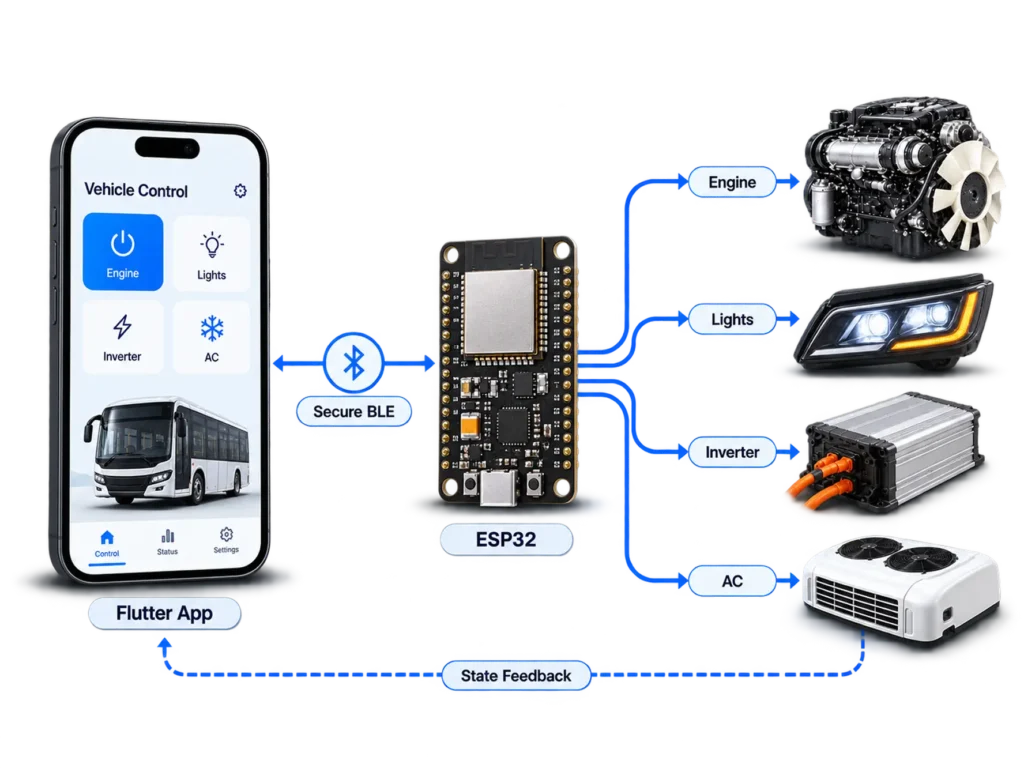
The architecture was deliberately local.
There was no requirement for a cloud connection in the control path. Once the mobile device was connected to the appropriate ESP32, commands could be exchanged directly between the application and the vehicle.
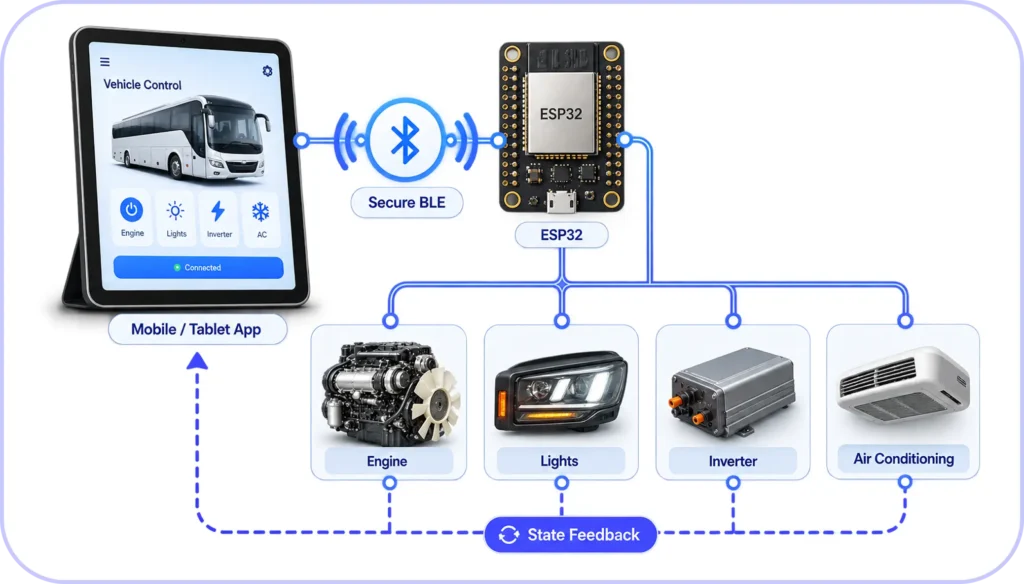
This was important because the application was intended to remain operational regardless of internet availability. The user could therefore operate the connected functions in remote locations or other environments where mobile data could not be assumed.
Secure Device Pairing
Direct control of physical equipment also introduced an access-control requirement.
Discovering a BLE device was not sufficient to gain access to the system. The application implemented passkey-based Bluetooth pairing so that only an authorized user could establish the connection required for control.
After successful pairing, the relevant device information was stored locally. This reduced the need to repeat the complete discovery and pairing process during subsequent sessions and supported automatic reconnection, particularly on Android devices.
The operational sequence was therefore:
The application also provided dedicated Scan and Help screens so that device discovery, pairing and connection were handled as part of the user workflow rather than exposed as low-level Bluetooth operations.
Maintaining Application State
BLE communication was only one part of the application. The UI also had to remain synchronized with changes coming from the connected system.
Flutter’s Provider package was used for application-state management. This allowed communication state and UI state to be separated so that changes received from the connected device could be propagated to the relevant interface components without tightly coupling BLE handling to individual screens.
The application additionally supported engine-state notifications, giving the user feedback when relevant operating conditions changed.
The final result was not simply a Bluetooth remote. It was a mobile control interface in which device discovery, authentication, connection management, command handling and user feedback had to operate as one system.
Application 2: Moving a Diesel Engine Controller to a Mobile Interface
The second application addressed a substantially different problem.
A diesel engine already had a dedicated controller responsible for engine operation, configuration, status monitoring and protection. The objective was not to replace the engine-control logic itself. The objective was to make the capabilities and information available through that controller accessible from a mobile device.
This introduced an important practical requirement.
The physical controller needs to remain close to the engine because it is part of the wired control system. An operator, however, should not always need to physically reach that controller simply to inspect engine information, modify an authorized setting or execute an available control operation.
The mobile application therefore became a portable interface to the engine controller.
The architecture can be represented as:
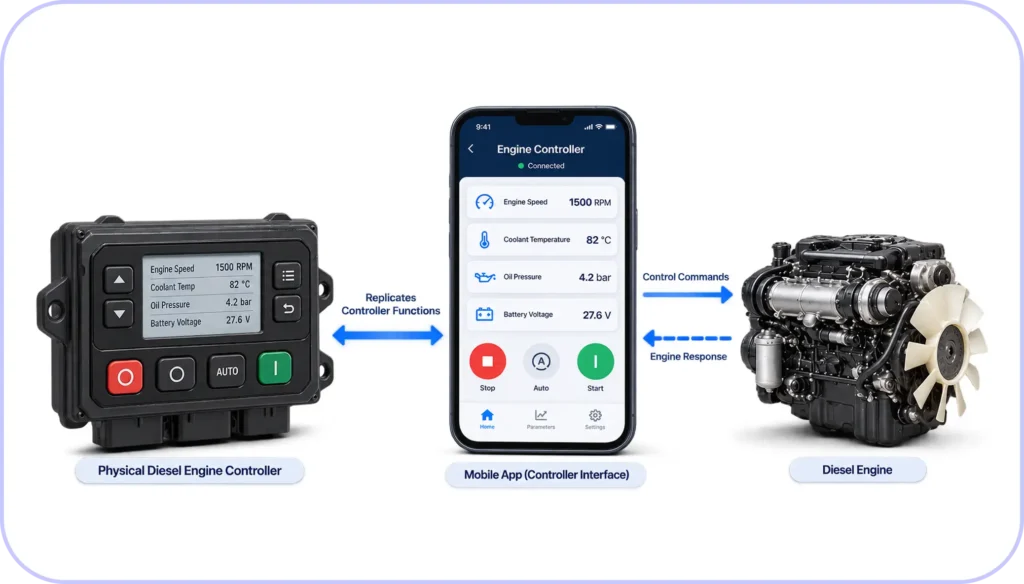
The controller remained responsible for interacting with the engine. The mobile application provided the operator interface over BLE.
This separated two concerns:
- The controller remained with the machine.
- The user interface became mobile.
Within the practical BLE operating range, an authorized operator could monitor and control the engine without remaining beside the physical controller.
Bringing Engine Operation and Configuration into the App
The application had to expose the operational information normally available through the controller.
This included live engine information such as engine speed, coolant temperature, pump temperature, oil pressure, fuel-related data, battery voltage, engine load and accumulated running hours.
The application also represented important engine and system states, including:
- Engine running
- Engine starting
- Warm-up
- Line fill
- Cool-down
- Shutdown
- Latched shutdown
- Alarm / shutdown on fault
- Ready / not connected
In addition to monitoring, the application supported control operations including Start, Stop, Reset and Auto Mode.
The configuration capability went further than simple start/stop control. Operating limits and engine behaviour could also be configured through the system.
For example, an allowable RPM range could be defined. If engine speed moved outside the permitted operating condition, the engine controller could initiate a protective shutdown.
Similar logic could be applied to other configured operating conditions. Fuel level thresholds could be monitored, while warm-up and cool-down behaviour could be incorporated into the operating sequence.
The application therefore had two distinct responsibilities:
Command and Configuration
The operator could initiate permitted actions and modify available controller settings.
Monitoring and Feedback
The application continuously represented the engine/controller state so that the operator could understand what the system was actually doing.
This distinction was fundamental to the design.
The Application Could Request an Action; the Controller Had to Confirm the State
One of the more important engineering requirements was ensuring that the mobile UI did not become the source of truth for the engine.
Consider an engine-start command.
A simplistic implementation could behave as follows:
But pressing a button does not prove that the physical engine has reached the requested state.
The correct sequence is closer to:
The same principle applies to shutdowns, alarms, warm-up, cool-down and configured operating limits.
For example, if the controller detects a condition that requires shutdown, the event does not originate from the mobile UI. The controller determines the state of the engine, initiates the appropriate action and communicates the resulting status back to the application.
The application must therefore represent both user-initiated commands and controller-initiated events.
This becomes particularly important for protective functions.
If a configured maximum RPM is exceeded, the application should not merely display a warning while continuing to assume normal operation. The controller can enter an alert or shutdown state, act on the engine and report that state to the application.
The mobile interface then reflects what the engine-control system has actually decided and executed.
Handling a Large Engine Parameter Set
The engine-control application was not built around a small collection of switches.
The underlying controller exposed a large set of operational values, states and configuration parameters—approximately 2,000 parameters across the complete system.
Some values were intended primarily for monitoring. Others represented configuration or operating behaviour. Some affected engine protection and shutdown logic.
This changed the application-design problem significantly.
The interface could not simply reproduce every controller value on one screen. Information had to be organized according to how an operator would use it.
For example, high-value live operating information such as:
could be presented through dedicated gauges, while other system and configuration information could be placed in appropriate secondary screens.
Similarly, device connectivity required its own workflow. The Configuration and Scan screens allowed the application to discover nearby Bluetooth devices and distinguish between discovered and previously paired devices.
The mobile application therefore became an abstraction layer over a much larger engine-control system. Its purpose was not to expose complexity indiscriminately, but to make the controller’s capabilities accessible in a usable mobile form.
One Mobile Device, One Active Vehicle Connection
The system was also designed around controlled one-to-one communication.
The application could discover and pair with other authorized vehicles in the vicinity, but it was not intended to simultaneously control multiple vehicles from one mobile session.
An authorized user could disconnect from one controller and connect to another, provided the required pairing credentials were available.
This design maintained a clear operating context:
The pairing mechanism was also the security boundary.
A nearby user could not simply discover a BLE advertisement and obtain engine-control access. The pairing code was required before the device could establish the authorized relationship needed for communication.
Because the application relied only on BLE and did not require an internet connection, this authentication and communication model remained available even when the vehicle was operating outside network coverage.
Two Applications, Two Different Control Problems
Although both applications used Flutter/BLE-based connected-device principles, the engineering problems were different.
The first application converted a set of vehicle functions into a mobile control interface. Its primary concerns were device discovery, secure pairing, persistent connectivity, responsive control and straightforward operator interaction.
The second application went substantially deeper into machine operation. The mobile interface had to represent engine data, controller state, operating modes, alarms, configuration and protection behaviour while preserving the controller as the authority over the physical engine.
That difference is important.
The first application can be summarized as:
The second is better described as:
In both cases, the mobile application was not developed independently of the embedded system. The behaviour of the software depended directly on how the controller identified devices, exchanged data, processed commands, reported state and protected the physical equipment.
Industrial Use Cases for the Same Architecture
The same architecture can be applied wherever a physical controller needs to remain close to machinery while the operator requires a secure and portable interface for monitoring, configuration or control.
Industrial Machinery
Machines with embedded controllers can expose selected operating functions through a BLE-enabled mobile application. Operators can monitor status, modify permitted parameters or execute control operations without remaining beside the physical control panel.
Pumps and Pumping Systems
Pump controllers can provide information such as pressure, flow, temperature, operating state and alarms to a nearby mobile device. Authorized users can also perform operations such as start, stop, reset or configuration within the permitted control logic.
Generator and Engine-Driven Equipment
Generator sets, diesel-powered machinery and other engine-driven systems can use a similar architecture to provide access to engine parameters, operating states, alarms, protection thresholds and controller functions from a mobile interface.
Construction and Heavy Equipment
Equipment used at construction, mining or infrastructure sites can provide technicians and operators with a portable interface for equipment status, diagnostics, configuration and selected control functions without requiring continuous access to the machine-mounted controller.
Agricultural Machinery
Engines, pumps and other equipment used in agricultural environments can use local BLE communication where internet connectivity may be unavailable or unreliable. The mobile device can act as a nearby operational and diagnostic interface.
Material Handling and Special-Purpose Vehicles
Forklifts, utility vehicles and other special-purpose equipment can expose selected vehicle and engine functions through a secure mobile interface while retaining physical control and protection logic within the embedded controller.
Across these applications, the underlying principle remains the same:
The mobile application extends access to the controller without transferring the responsibility for machine protection away from the embedded system.
Conclusion
These applications demonstrate two different ways in which mobile software can become part of a connected vehicle architecture.
In the first, BLE was used to provide direct and secure control of vehicle functions through a cross-platform application without depending on internet connectivity.
In the second, the same mobility principle was applied to a much more complex system: a diesel engine controller with extensive operational data, configuration, engine states, control commands, alarms and protective logic.
The central engineering requirement in both cases was the same: the software interface had to remain aligned with the behaviour of the physical system.
The application could initiate commands, present configuration and improve operator mobility, but the embedded controller and the equipment remained responsible for the actual machine state.
That boundary between mobile software and physical control is what defined the architecture of both applications.
Building Software Around a Connected Product?
We work on mobile apps, web platforms and backend systems that communicate with real devices and embedded hardware.




- Drafted using AI


 Hardware/PCB design & addon services


